August 2026
How to Record a Phone Call on iPhone and Android
If you want to know how to record a phone call, the answer depends on your phone and on where you live. On an iPhone the Phone app records calls itself, no extra app needed, as long as Apple offers the feature in your country. On Android it depends on your region and device. And the law draws lines you should know before you press record. This guide walks through all of it, plus an alternative that skips recording entirely.
First things first: what the law says
Under federal law and in most US states, recording a call you take part in is legal with the consent of one party, and you count as that party. Several states set the bar higher and require the consent of everyone on the call. For phone conversations that group is usually given as California, Connecticut, Delaware, Florida, Illinois, Maryland, Massachusetts, Montana, Nevada, New Hampshire, Pennsylvania and Washington, with Michigan and Oregon disputed. Things get murky when you call across state lines, so the practical rule of thumb is simple: when in doubt, ask first. A quick "I'd like to record this call, is that okay?" settles the question and puts the consent right on the recording.
Keep in mind that many other countries are stricter than the US; in parts of Europe, recording a private call without everyone's consent is a criminal offense.
The built-in features from Apple and Google help with this part. They announce the recording to everyone on the call, so recording secretly is simply not possible with them.
How to record a phone call on an iPhone
Recording is built into the Phone app. Apple names no model requirement for it beyond the iOS version, and iOS 26 runs on the iPhone 11 and the iPhone SE (2nd generation) and later. What does decide it is where you are. Apple keeps a list of countries where call recording stays switched off, and the whole EU is on it, so readers in Ireland don't get it. South Africa is on the list too. Where it is available, here is how it works:
- Make or answer a call as usual.
- On the call screen, open the menu with the extra call options and tap Call Recording. Everyone on the call now hears an announcement that the call is being recorded.
- Stop the recording, or just hang up. The end of the recording is announced too.
- You'll find the recording in the Call Recordings folder of the Notes app, with an automatic transcript if you spoke English. Apple's transcription covers only a short list of languages.
Two things are worth knowing. First: the announcement cannot be turned off, by any setting. Apple built the feature so that a secret recording is impossible. Second: the recordings live in the Notes app, not in your call history. If you record calls regularly, you quickly end up with an unsorted pile of audio files in there. The details, including the country list and what the transcript is good for, are in how to record a phone call on iPhone.
iPhone without the built-in feature
On older iOS versions, or in a country where Apple blocks the feature, there is no built-in way. The Voice Memos app can't record during a call; iOS blocks microphone access while you're on the phone. What's left are workarounds: put the call on speaker and record it with a second device, or use a recording service that joins the call as a third party on a conference line. Every third-party call recorder app on the iPhone works this way and charges a subscription for it, because Apple gives apps no access to call audio at all. Both routes work, both cost you quality and convenience, and the law stays the same: no consent, no recording.
How to record a phone call on Android
On Android the honest answer is: it depends. Google's Phone app has a recording feature, but only in certain regions and languages. If you don't see a record button during a call, the feature is not available in your region, and no setting will change that. Samsung ships call recording only in some market firmwares; the same model can have the button in one country and lack it in another.
Third-party apps like Cube ACR try to fill the gap but run into a system limit: since Android 10, apps can no longer access the call audio stream directly. They record via the microphone instead, so the other side is often quiet or hard to hear. Whether the result is usable depends on your phone model, and it can change with any update. It's nothing to rely on.
WhatsApp, FaceTime and other messengers
Calls over WhatsApp, FaceTime or Telegram have no built-in recording feature, and the iPhone's recording only covers normal phone calls. That leaves the speakerphone workaround with a second device. The consent rules apply here exactly as they do on a regular call.
The alternative: document instead of record
Before you go to all that trouble, an honest question is worth asking: do you really need the exact words? In most cases what you actually need is something else: who called, when, what was discussed and what happens next. That takes no recording, no consent question and no announcement that changes the tone of the call before it has started.
That's how Callvent came about, by the way. I work in fixed focus blocks during which I don't answer the phone. Afterwards there was regularly a stack of calls waiting, and I put them in my calendar to call back when it fit my schedule. At some point I turned that habit into an app.
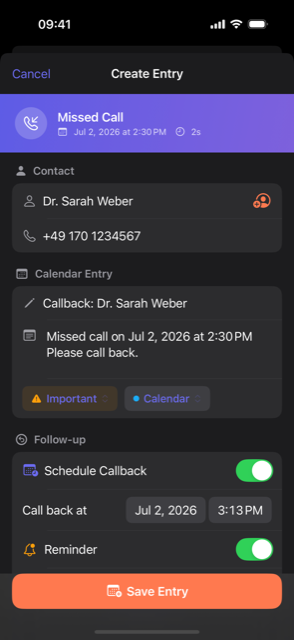
That is exactly what Callvent does: after you hang up, one tap turns the call into a calendar event, with contact, time, note and a callback reminder. The app records no audio, and all data stays on your device. The person on the other end just talks to you, with no announcement and no feeling of being on tape. It works with normal calls and detects WhatsApp, FaceTime, Telegram, Teams and Zoom calls too. On the iPhone you assign the contact with one tap, since Apple exposes no phone numbers to apps; on Android the number comes straight from the system call log. You can try it free for 7 days.
If you prefer to document calls by hand, there's a free call log template you can print out or fill in digitally.
Frequently asked questions
Is it legal to record a phone call? +
Under federal law and in most US states, yes, as long as one party to the call consents, and you count as that party. A dozen or so states require the consent of everyone on the call, usually listed as California, Connecticut, Delaware, Florida, Illinois, Maryland, Massachusetts, Montana, Nevada, New Hampshire, Pennsylvania and Washington, with Michigan and Oregon disputed. When in doubt, ask first. Many other countries are stricter than the US.
Does the other person hear that I'm recording? +
With the built-in iPhone feature, yes: everyone on the call hears an announcement when the recording starts and again when it ends. There is no setting to turn the announcement off. Google's and Samsung's recording features also play announcements where they are available.
Where does the iPhone save call recordings? +
In the Call Recordings folder of the Notes app, not in the Phone app. The audio file sits there together with a transcript, which Apple offers for English and a handful of other languages.
What is the best call recorder app? +
On the iPhone you usually don't need one: the Phone app records calls itself, wherever Apple offers the feature. It is switched off across the EU, which includes Ireland, and in South Africa. Third-party iPhone recorder apps all route your call through a conference line and charge subscriptions, because Apple gives apps no access to call audio. On Android, third-party apps have recorded via the microphone since Android 10, so results vary by device. If you only need to document calls, Callvent keeps contact, time and notes without recording any audio.
Can you record a WhatsApp call? +
WhatsApp has no built-in recording feature, and the iPhone's recording only covers normal phone calls. The usual workaround is speakerphone plus a second recording device. The same consent rules apply as for a regular call.
This article is general information, not legal advice. If you're unsure whether you may record a call, ask a lawyer.