August 2026
How to Record a Phone Call on iPhone
The iPhone records phone calls on its own, with no extra app and no subscription. Tapping the button takes five seconds. The parts that actually decide whether the feature is useful to you take longer to explain: an announcement both sides hear and nobody can switch off, a storage location most people never think to look in, and a list of countries where the option does not appear at all.
What you need before you start
Call recording arrived with iOS 18 and sits in the Phone app. The steps below describe iOS 26, where the entry moved into the More menu on the call screen. Two things people expect to matter do not. You do not need Apple Intelligence: recording and transcription are ordinary Phone app functions, and only the written summary of the conversation depends on the AI features. And Apple names no model requirement for the recording. The claim that it takes an iPhone XS or newer confuses the feature with the system requirement of an older iOS release. iOS 26 itself runs on the iPhone 11 and the iPhone SE (2nd generation) and later.
What does decide it is where you are. In the United States and Japan the feature is documented and available. Further down there is a section on the countries where Apple keeps it switched off.
How to record a phone call on iPhone
- Make or answer the call in the Phone app as you normally would.
- While the call is running, tap the More menu on the call screen.
- Tap Call Recording. Both sides now hear a spoken announcement that the call is being recorded, and there is no setting that turns it off.
- Stop the recording from the call screen, or simply hang up. The end of the recording is announced as well.
- Open the Notes app and go to the Call Recordings folder. The audio file sits there, with a transcript if you spoke one of the languages Apple supports.
Since iPadOS 26 and macOS Tahoe the same feature exists on the iPad and the Mac, with the recordings landing in Notes there as well.
The announcement is the part to plan around
When the recording starts, both parties hear Apple's announcement. They hear a second one when it stops. There is no toggle, no developer setting and no accessibility trick that removes it, and Apple built the feature that way on purpose. If you want a recording of a call, the other person will know.
In practice that changes the first thirty seconds of the conversation. An announcement dropping in unannounced tends to make people cautious, and a customer who was about to complain freely often switches into careful sentences. It costs nothing to get ahead of it: say that you would like to record the call and why, wait for the answer, then tap. The announcement then confirms what you just agreed on rather than interrupting.
Where the recording ends up, and what the transcript gives you
Recordings do not go anywhere near your call history. They land in the Notes app, in a folder named Call Recordings. Each one is a regular note holding the audio, which means you can move it into another folder, put it in a shared note or copy the text out of it.
Apple generates the transcript automatically for a short list of languages. Its feature availability page names Cantonese (Hong Kong), English (Australia, Canada, India, New Zealand, Singapore, the UK and the US), Japanese, Korean, Mandarin, Brazilian Portuguese and Spanish (Mexico and the US). For an English call you therefore get searchable text, which is worth more than the audio in most situations: Notes search finds a name or a figure in a two-month-old call in seconds, while an audio file has to be listened to.
One piece of housekeeping. The notes are named after the call, not after what was said, so a folder of twenty of them all look alike. Renaming a recording right after the call, or pasting two lines from the transcript to the top of the note, saves the search later.
What the feature does not cover
Only calls between two people can be recorded. Start a conference call and the option is gone. FaceTime, WhatsApp, Telegram and Teams calls are not covered either, since the recording belongs to the Phone app and those calls never pass through it.
Nor is there a way around this with another app. As an app developer I can name the limit precisely: iOS gives apps no access to the audio of a call. Through CallKit an app learns that a call is happening and how long it lasts, and not even the phone number is handed over. That is why every call recorder in the App Store works by dialling a conference bridge of its own into the call, and why they all charge a monthly fee for it. The Voice Memos app is no help either, because iOS blocks microphone access for other apps while a call is running.
The countries where the option does not appear
Apple publishes the list in the iPhone User Guide. Call recording is not available anywhere in the European Union, which is the answer for readers in Ireland. Also on the list are Azerbaijan, Bahrain, Egypt, Iran, Iraq, Jordan, Kuwait, Morocco, Nigeria, Oman, Pakistan, Qatar, Russia, Saudi Arabia, South Africa, Turkey, the United Arab Emirates and Yemen.
The restriction has been in place since the feature launched, so articles claiming Apple removed it from Europe later are simply wrong. On a device in one of these regions the entry never shows up in the More menu, and there is no setting that reveals it. If you are elsewhere and still see no Call Recording entry, check your iOS version first.
Consent: what the law expects of you
Federal law in the US requires the consent of at least one party to the call, and as a participant you are that party. A number of states set the bar at everyone on the call. For telephone conversations that group is usually given as California, Connecticut, Delaware, Florida, Illinois, Maryland, Massachusetts, Montana, Nevada, New Hampshire, Pennsylvania and Washington, with Michigan and Oregon disputed depending on which court you read. Massachusetts is worth singling out because its statute turns on secret recording rather than on counting consents.
Calls across state lines are the awkward case. Courts disagree on whether the law of the recorder's state or the law of the other party's state applies, and the Reporters Committee for Freedom of the Press advises assuming the stricter of the two. The workable habit is to ask before you record, every time, whichever state you are sitting in. The announcement makes the question unavoidable anyway, and an audible yes at the start of the recording is the best documentation of consent you will get.
Outside the US the rules differ from market to market and several countries are considerably stricter, which is part of why Apple switches the feature off in some of them. None of this is legal advice.
When you do not actually need the audio
It is worth asking what you want the recording for. A journalist verifying a quote needs the exact words. Most people who record work calls do not: they want to know later who called, when, what was agreed and what they promised to do next. A recording answers that badly, because you have to listen to it again to find out.
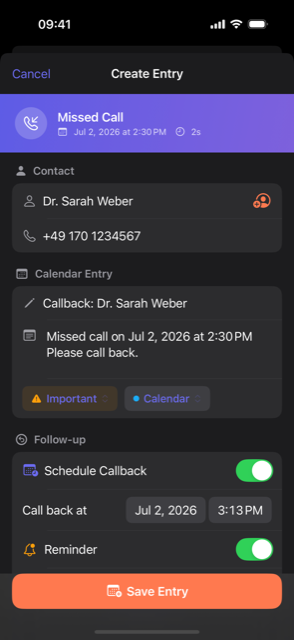
That is what Callvent is for. After you hang up, one tap turns the call into a calendar event with the contact, the time, your note and a callback reminder if you need one. The app records no audio at all, so there is no announcement, no consent question and nothing for the other side to react to. It works in the regions where Apple's recording does not, since it never touches the call audio in the first place. If you would rather write things down on paper, there is a free call log template as well.
For the Android side of the question and the workarounds when no built-in recording is available, see how to record a phone call.
Frequently asked questions
Does the other person know that I am recording? +
Yes. Everyone on the call hears a spoken announcement when the recording starts, and another one when it ends. Apple provides no setting to switch the announcement off, so the built-in feature cannot be used to record someone without their knowledge.
Where does the iPhone save call recordings? +
In the Notes app, in a folder called Call Recordings. They are not in the Phone app and not in your call history. Each recording is a note holding the audio file, plus a transcript if the language is supported.
Do I need Apple Intelligence to record calls? +
No. Recording and transcription are ordinary functions of the Phone app. Only the written summary of the conversation requires Apple Intelligence.
Why is there no Call Recording option on my iPhone? +
Most likely your region. Apple lists the countries where call recording is not available, and the entire European Union is on that list, which includes Ireland. Russia, Turkey, South Africa, Nigeria, Pakistan and several countries in the Middle East and North Africa are on it too. No setting brings the option back.
Can I record a conference call or a FaceTime call? +
No. The feature covers one-to-one phone calls only. Conference calls are out, and so are FaceTime, WhatsApp and other messenger calls, because the recording lives in the Phone app.
Which iPhone models support call recording? +
Apple documents no model requirement for the recording itself. What matters is the iOS version and the region. iOS 26 runs on the iPhone 11 and the iPhone SE (2nd generation) and later, so anything that can install it is a candidate.
This article is general information, not legal advice. If you are unsure whether you may record a particular call, ask a lawyer.