Every call deserves an entry .
Turn phone calls into calendar entries with a contact, time and notes.
Free to try from $0.99/mo · 7-day free trial · No tracking
How do you keep important call details?
You hang up and think: “I need to remember this.” But the next call comes in, the next meeting starts – and the important details slip away.
Missed calls you forget to return
Conversations without notes that fade within hours
No record of when you spoke with whom
Callvent fixes that.
When the app catches the end of a call, it reminds you to create a calendar entry. Otherwise one tap after hanging up does it. Pick a contact, add a quick note, done.
The app automatically detects when a call ends and pre-fills the contact, time, and duration. Just add a quick note and save.
From a call to written notes in four steps.
From phone call to calendar entry – without typing a single name.
Contact and call details are pre-filled. Review the entry and save it.
Call detected
Answered, made, or missed – Callvent detects calls while the app is running. It captures time, duration, and direction. Who called stays private.
With your permission, Callvent reads time, duration, direction and available numbers from the Android call log. Matching contacts are assigned.
Get notified
When the call is detected, a notification with the call duration appears after you hang up. Tap it or choose “Quick Save”.
Assign a contact
Contact detected
Pick the contact from your address book – one tap. Apple intentionally prevents apps from reading phone numbers from calls. That’s why you assign the contact yourself.
Callvent automatically reads the phone number from your call log and matches it to your contacts. You can adjust the contact if needed.
Save
Check the contact and time, add an optional note or tag, then save to your chosen calendar. You can find the entry there later.
Everything you need. Nothing you don’t.
Call Detection
On iPhone, Callvent detects calls through Apple’s CallKit while the app is active. These can include cellular calls, FaceTime and CallKit-compatible calls in WhatsApp, Teams or Zoom. CallKit does not provide phone numbers for these calls. Log missing calls using a widget, the Action Button or Siri.
With your permission, Callvent reads the Android call log and matches available numbers to your contacts. WhatsApp, Teams and other VoIP calls are captured only if they appear in that log.
Assign Contact in One Tap
Automatic Contact Matching
Assign the call to a contact – one tap on the name is all it takes. You decide what data gets saved.
Callvent reads the phone number from your call log and automatically matches it to your contacts. Adjust the match if needed.
Calendar Entry in Seconds
Title, date, time and duration are pre-filled. Just add an optional note and save.
Quick Save
Swipe in the call list or tap the notification – and the entry goes straight to your default calendar.
Caller ID
Call Log Access
Import contacts into the identification system. See names on your lock screen when they call.
Full access to your call log with phone numbers, contact names, duration, and call type.
Never Miss a Callback
Callback reminder in 15 min, 30 min, 1 hour, 2 hours, or tomorrow morning. Saved directly to the Reminders app.
Callback reminder in 15 min, 30 min, 1 hour, 2 hours, or tomorrow morning. Saved as a reminder notification.
Tags, Filters & Search
Categorize calls: Business, Personal, Important, Follow-up. Filter and search your call list.
Your Calendar, Your Choice
Use a writable calendar available to Callvent on your device: for example iCloud on iOS, or Google Calendar, Outlook and CalDAV when configured accordingly.
Smart Notifications
When a call is detected, a notification with duration and Quick Save action appears. No need to open the app.
Home Screen Widget
See pending calls right on your home screen. Small and medium widgets with a pending counter.
Statistics
Call overview with total duration, weekday breakdown, tag analysis, and coverage indicators.
Siri Shortcuts
Quick Settings
“Hey Siri, log my last call.” Create calendar entries by voice – without opening the app.
Add a Callvent tile to your Quick Settings. Quick access to the app – right from the status bar.
Built for people who talk.
Whether it’s 3 calls or 30 – Callvent keeps you organized.
Freelancers
Keep client calls in your calendar with times and notes. Check the captured duration before adding it to your time tracking or invoice.
Sales & Consulting
Note call outcomes for later entry into your CRM and plan callbacks. Callvent does not offer direct CRM syncing.
Heavy Callers
Stay organized without an expensive CRM system.
Support & Legal
Keep a written record of your calls – for clients, customers, or internal processes.
What makes Callvent different.
Four good reasons to choose Callvent.
Free to try – flexible plans
7-day free trial. Then from $0.99/month, $4.99/year, or $14.99 lifetime. No risk, cancel anytime.
Call list stored locally
Callvent has no cloud service for your call list and requires no account. Events may sync through your calendar provider; paired watches can receive call data.
All in one app
Call detection, calendar integration, Caller ID, widget, and Siri – no extra tools or plugins needed.
Call detection, calendar integration, automatic contact matching, widget, and Quick Settings – no extra tools or plugins needed.
No tracking
No analytics SDKs, no ads, no data collection. Callvent respects your privacy 100%.
Your calls. Your data. Your device.
Call list stored locally.
No Callvent cloud. Your calendar provider may sync events; paired watches can receive call data.
No access to phone numbers.
Phone numbers stay on your device.
Apple prevents apps from reading numbers from calls. Callvent only knows time, duration, and direction.
With your permission, Callvent reads numbers from the call log and matches them to contacts on your device.
Protected contact picker.
Contact access only for matching.
Runs in a sandboxed iOS process – the app only sees the contact you choose.
Callvent only accesses your contacts to match phone numbers. No contact data is sent to any server.
No account required.
Callvent requires no registration or login.
Choose your plan.
Start with 7 days free. No cloud, no tracking, no ads.
per month
per year
Save 58% vs. monthly
one-time payment
Try all features for 7 days. Then choose a paid plan if you need one. The price and terms shown in your App Store or Google Play apply.
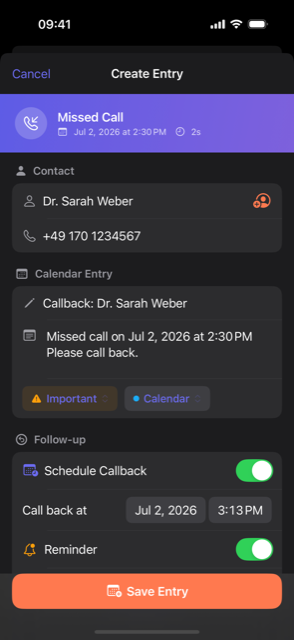
What a call note looks like.
The iPhone screenshot shows a contact, note, tag and callback plan in one entry. The guides explain how to document calls and the limits of iOS and Android.
Questions? Answers.
Can the app see who I’m calling?
Does the app have to stay open?
What is Caller ID and how does it work?
Which calendars are supported?
Is my data synced?
How does the free trial work?
iOS: Does Callvent work with WhatsApp, FaceTime, or Teams?
Android: Does Callvent detect all calls?
iOS: Is there an Android version?
Android: Is there an iOS version?
Can I export my data?
How do I delete my data?
How do I document client calls for billing?
Can I transfer call notes to HubSpot, Salesforce or Pipedrive?
Does Callvent record calls or create transcripts?
Ready to remember every call?
Callvent is available now on the App Store and Google Play. Start your 7-day free trial.